Category Archives: Crisis Mapping

Mobile Crisis Mapping (MCM)

I first blogged about Mobile Crisis Mapping (MCM) back in October 2008 and several times since. The purpose of this post to put together the big picture. What do I mean by MCM? Why is it important? And how would I like to see MCM evolve?

Classical MCM

When I coined the term Mobile Crisis Mapping last October, I wrote that MCM was the next logical step in the field of crisis mapping. One month later, at the first Crisis Mappers Meeting, I emphasized the need to think of maps as communication tools and once again referred to MCM. In my posts on the Crisis Mapping Conference Proposal and A Brief History of Crisis Mapping, I referred to MCM but only in passing.

More recently, I noted the MCM component of the UN’s Threat and Risk Mapping (TRMA) project in the Sudan and referred to two projects presented at the ICTD2009 conference in Doha—one on quality of data collected using mobile phones and the second on a community-based mapping iniative called Folksomaps.

So what is Mobile Crisis Mapping? The most obvious answer is that MCM is the collection of georeferenced crisis information using peer to peer (P2P) mobile technology. Related to MCM are the challenges of data validation, communication security and so on.

Extending MCM

But there’s more. P2P communication is bi-directional, e.g., two-way SMS broadcasting. This means that MCM is also about the ability of the end-user in the field being to query a crisis map using an SMS and/or voice-based interface. Therein lies the combined value of MCM: collection and query.

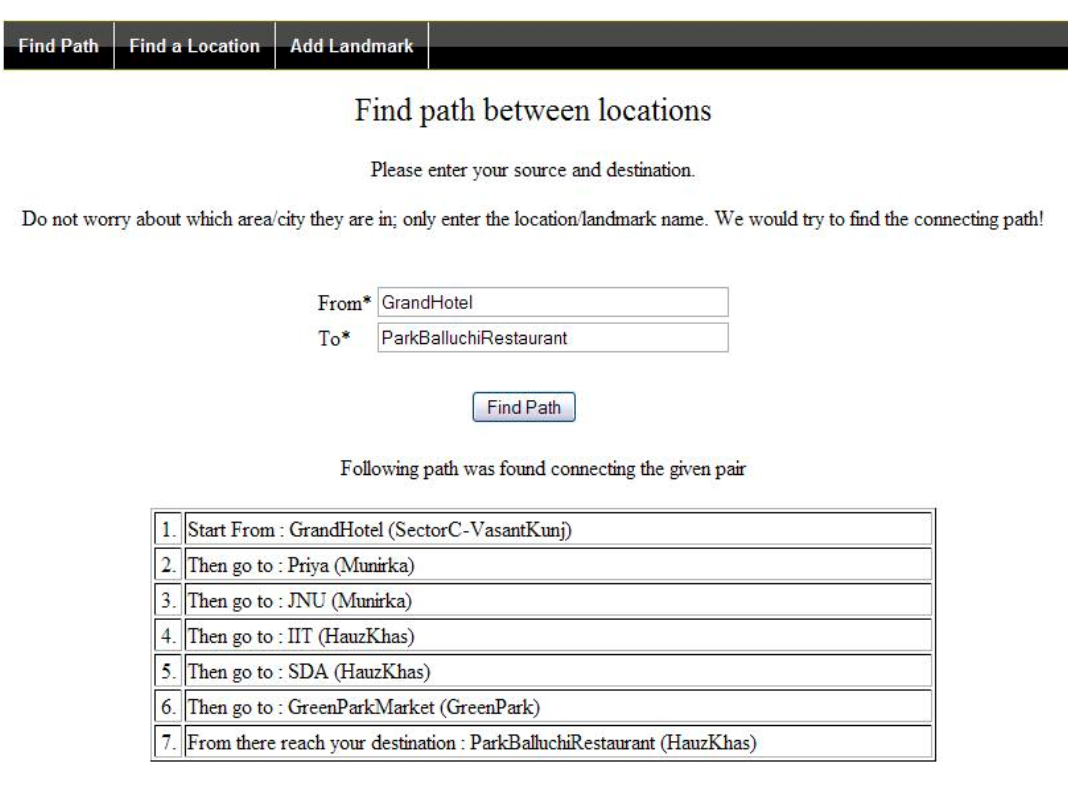
The Folksomaps case study comes closest to what I have in mind. The project uses binary operators to categorize relationships between objects mapped to render queries possible. For instance, ‘is towards left of’ could be characterized as <Libya, Egypt>.

The methodology draws on the Web Ontology Language (OWL) to model the categorical characteristics of an object (e.g., direction, proximity, etc), and thence infer new relationships not explicitly specified by users of the system. In other words, Folksomaps provides an ontology of locations.

Once this ontology is created, the map can actually be queried at a distance. That’s what I consider to be the truly innovative and unique aspect of MCM. The potential added value is huge, and James BonTempo describes exactly how huge MCM could be in his superb presentation on extending FrontlineSMS.

An initiative related to Folksomaps and very much in line with my thinking about MCM is Cartagen. This project uses string-based geocoding (e.g. “map Bhagalpur, India”) to allow users in the field to produce and search their own maps by using the most basic of mobile phones. “This widens participation to 4 billion cell phone users worldwide, as well as to rural regions outside the reach of the internet. Geographic mapping with text messages has applications in disaster response and health care.”

MCM Scenario

The query functionality is thus key to Mobile Crisis Mapping. One should be able to “mobile-query” a crisis map by SMS or voice.

If I’m interfacing with an Ushahidi deployment in the Sudan, I should be able to send an SMS to find out where, relative to my location, an IDP camp is located; or where the closest airfield is, etc. Query results can be texted back to the mobile phone and the user can forward that result to others. I should also be able to call up a designated number and walk through a simple Interactive Voice Response (IVR) interface to get the same answer.

Once these basic search queries are made available, more complex, nested queries can be developed—again, see James BonTempo’s presentation to get a sense of the tremendous potential of MCM.

The reason I see MCM as the next logical step in the field of crisis mapping is because more individuals have access to mobile phones in humanitarian crises than a computer connected to the Web. In short, the point of Mobile Crisis Mapping is to bring Crisis Mapping Analytics (CMA) to the mobile phone.

Patrick Philippe Meier

JRC: Geo-Spatial Analysis for Global Security

The European Commission’s Joint Research Center (JRC) is doing some phenomenal work on Geo-Spatial Information Analysis for Global Security and Stability. I’ve had several meetings with JRC colleagues over the years and have always been very impressed with their projects.

The group is not very well known outside Europe so the purpose of this blog post is to highlight some of the Center’s projects.

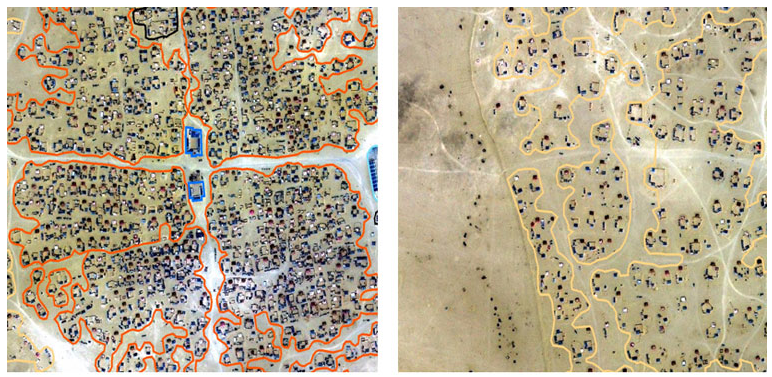
  • Enumeration of Refugee Camps: The project developed an operational methodology to estimate refugee populations using very high resolution (VHR) satellite imagery. “The methodology relies on a combination of machine-assisted procedures, photo-interpretation and statistical sampling.”

jrc1

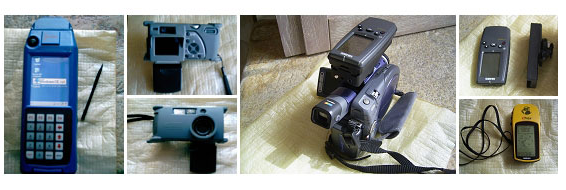
  • Benchmarking Hand Held Equipment for Field Data Collection: This project tested new devices for the collection for geo-referenced information. “The assessment of the instruments considered their technical characteristics, like the availability of necessary instruments or functionalities, technical features, hardware specifics, software compatibility and interfaces.”

jrc3

  • GEOCREW – Study on Geodata and Crisis Early Warning: This project analyzed the use of geo-spatial technology in the decision-making process of institutions dealing with international crises. The project also aimed to show best practice in the use of geo-spatial technologies in the decision-making process.
  • Support to Peacekeeping Operations in the Sudan: Maps are generally not available or often are out of date for most of the conflict areas in which peacekeping personnel is deployed,  This UNDPKO Darfur mapping initiative aimed to create an alliance of partners that addressed this gap and shared the results.

jrc4

  • Temporary Settlement Analysis by Remote Sensing: The project analyzes different types of refugee and IDP settlements to identify single structures inside refugee settlements. “The objective of the project is to establish the first comprehensive catalog of image interpretation keys, based on last-generation satellite data and related to the analysis of transitional settlements.”

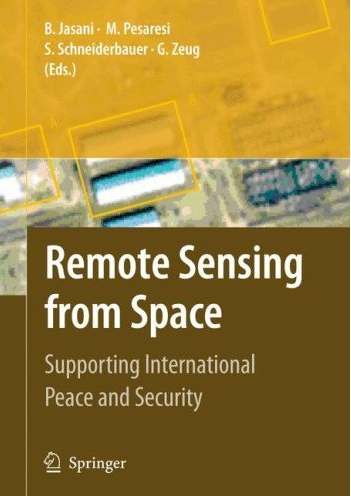
JRC colleagues often publish papers on their work and I highly recommend having a look at this book when it comes out in June 2009:

jrc5

Patrick Philippe Meier

Video Introduction to Crisis Mapping

I’ve given many presentations on crisis mapping over the past two years but these were never filmed. So I decided to create this video presentation with narration in order to share my findings more widely and hopefully get a lot of feedback in the process. The presentation is not meant to be exhaustive although the video does run to about 30 minutes.

The topics covered in this presentation include:

  • Crisis Map Sourcing – information collection;
  • Mobile Crisis Mapping – mobile technology;
  • Crisis Mapping Visualization – data visualization;
  • Crisis Mapping Analysis – spatial analysis.

The presentation references several blog posts of mine in addition to several operational projects to illustrate the main concepts behind crisis mapping. The individual blog posts featured in the presentation are listed below:

This research is the product of a 2-year grant provided by Humanity United  (HU) to the Harvard Humanitarian Initiative’s (HHI) Program on Crisis Mapping and Early Warning, where I am a doctoral fellow.

I look forward to any questions/suggestions you may have on the video primer!

Patrick Philippe Meier

Folksomaps: Gold Standard for Community Mapping

There were a number of mapping-related papers, posters and demo’s at ICTD2009. One paper in particular caught my intention given the topic’s direct relevance to my ongoing consulting work with the UN’s Threat and Risk Mapping Analysis (TRMA) project in the Sudan and the upcoming ecosystem project in Liberia with Ushahidi and Humanity United.

Introduction

Entitled “Folksomaps – Towards Community Intelligent Maps for Developing Regions,” the paper outlines a community-driven approach for creating maps by drawing on “Web 2.0 principles” and “Semantic Web technologies” but without having to rely entirely on a web-based interface. Indeed, Folksomaps “makes use of web and voice applications to provide access to its services.”

I particularly value the authors’ aim to “provide map-based services that represent user’s intuitive way of finding locations and directions in developing regions.” This is an approach that definitely resonates with me. Indeed, it is our responsibility to adapt and customize our community-based mapping tools to meet the needs, habits and symbology of the end user; not the other way around.

I highly recommend this paper (or summary below) to anyone doing work in the crisis mapping field. In fact, I consider it required reading. The paper is co-authored by Arun Kumar, Dipanjan Chakraborty, Himanshu Chauhan, Sheetal Agarwal and Nitendra Rajput of IBM India Research Lab in New Delhi.

Background

Vast rural areas of developing countries do not have detailed maps or mapping tools. Rural populations are generally semi-literate, low-income and non-tech savvy. They are hardly like to have access to neogeography platforms like Google Earth. Moreover, the lack of electricity access and Internet connection also complicates the situation.

We also know that cities, towns and villages in developing countries “typically do not have well structured naming of streets, roads and houses,” which means “key landmarks become very important in specifying locations and directions.”

Drawing on these insights, the authors seek to tap the collective efforts of local communities to populate, maintain and access content for their own benefit—an approach I have described as crowdfeeding.

Surveys of Tech and Non-Tech Users

The study is centered on end-user needs, which is rather refreshing. The authors carried out a series of surveys to be better understand the profiles of end-users, e.g., tech and non-tech users.

The first survey sought to identify answers to the following questions:

  • How do people find out points of interest?
  • How do much people rely on maps versus people on the streets?
  • How do people provide local information to other people?
  • Whether people are interested in consuming and feeding information for a community-driven map system?

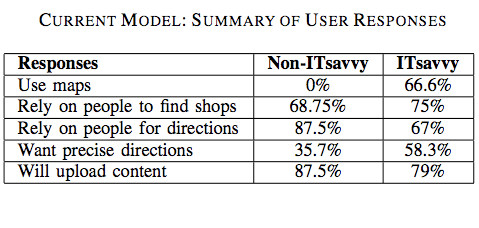
The results are listed in the table below:
folksotb1

Non-tech savvy users did not use maps to find information about locations and only 36% of these users required precise information. In addition, 75% of non-tech respondents preferred the choice of a phone-based interface, which really drives home the need for what I have coined “Mobile Crisis Mapping” or MCM.

Tech-users also rely primarily on others (as opposed to maps) for location related information. The authors associate this result with the lack of signboards in countries like India. “Many a times, the maps do not contain fine-grained information in the first place.”

Most tech-users responded that a phone-based location and direction finding system in addition to a web-based interface. Almost 80% expressed interest in “contributing to the service by uploading content either over the phone or though a web-based portal.”

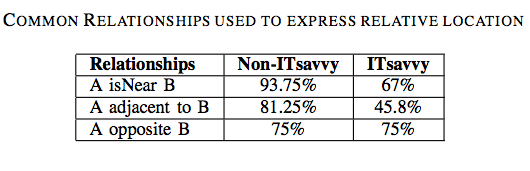
The second survey sought to identify how tech and non-tech users express directions and local information. For example:

  • How do you give directions to people on the road or to friends?
  • How do you describe proximity of a landmark to another one?
  • How do you describe distance? Kilometers or using time-to-travel?

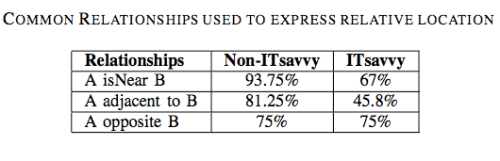
The results are listed in the table below:
folksotb2

The majority of non-tech savvy participants said they make use of landmarks when giving directions. “They use names of big roads […] and use ‘near to’, ‘adjacent to’, ‘opposite to’ relations with respect to visible and popular landmarks […].” Almost 40% of responders said they use time only to describe the distance between any two locations.

Tech-savvy participants almost always use both time and kilometers as a measure to represent distance. Only 10% or so of participants used kilometers only to represent distance.

The Technology

The following characteristics highlight the design choices that differentiate Folksomaps from established notions of map systems:

  • Relies on user generated content rather than data populated by professionals;
  • Strives for spatial integrity in the logical sense and does not consider spatial integrity in the physical sense as essential (which is a defining feature of social maps);
  • Does not consider visual representation as essential, which is important considering the fact that a large segment of users in developing countries do not have access to Internet (hence my own emphasis on mobile crisis mapping);
  • Is non-static and intelligent in the sense that it infers new information from what is entered by the users.
  • User input is not verified by the system and it is possible that pieces of incorrect information in the knowledgebase may be present at different points of time. Folksomaps adopts the Wiki model and allows all users to add, edit and remove content freely while keeping maps up-to-date.

Conceptual Design

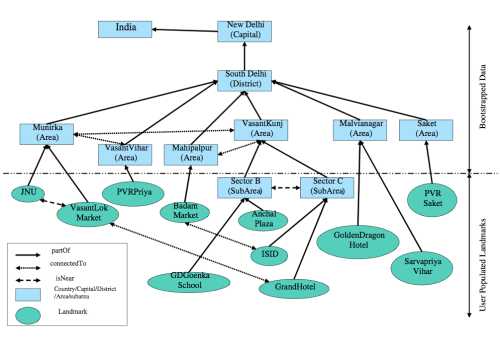
Folksomaps uses “landmark” as the basic unit in the mapping knowledgebase model while “location” represents more coarse-grained geographical areas such as a village, city or country. The model then seeks to capture a few key logical characteristics of locations such as direction, distance, proximity and reachability and layer.

The latter constitutes the granularity of the geographic area that a location represents. “The notion of direction and distance from a location is interpreted with respect to the layer that the location represents. In other words, direction and distance could be viewed as binary operator over locations of the same level. For instance, ‘is towards left of ’ would be appropriate if the location pair being considered is <Libya, Egypt>,” but not if the pair is <Nairobi, India>.

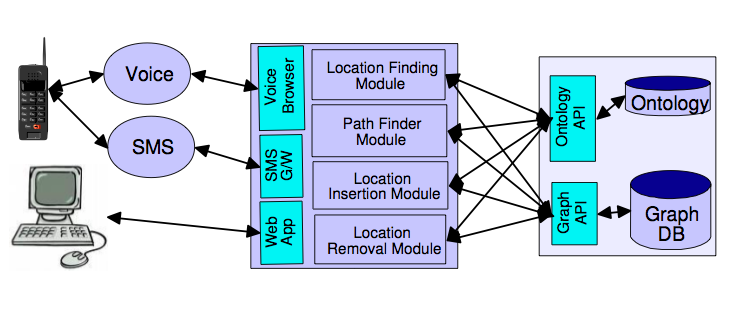
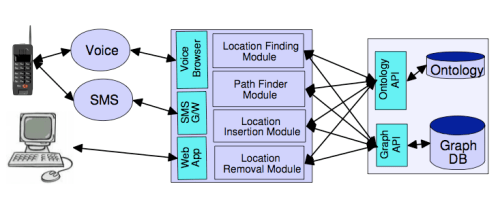
The knowledgebase makes use of two modules, the Web Ontology Language (OWL) and a graph database, to represent and store the above concepts. The Semantic Web language OWL is used to model the categorical characteristics of a landmark (e.g., direction, proximity, etc), and thence infer new relationships not explicitly specified by users of the system. In other words, OWL provides an ontology of locations.

The graph database is used represent distance (numerical relationships) between landmarks. “The locations are represented by nodes and the edges between two nodes of the graph are labeled with the distance between the corresponding locations.” Given the insights gained from user surveys, precise distances and directions are not integral components of community-based maps.

The two modules are used to generate answers to queries submitted by users.

User Interaction

The authors rightly recognize that the user interface design is critical to the success of community-based mapping projects. To be sure, users of may be illiterate, or semi-illiterate and not very tech-savvy. Furthermore, users will tend to query the map system when they need it most, e.g., “when they are stuck on the road looking for directions […] and would be pressed for time.” This very much holds true for crisis mapping as well.

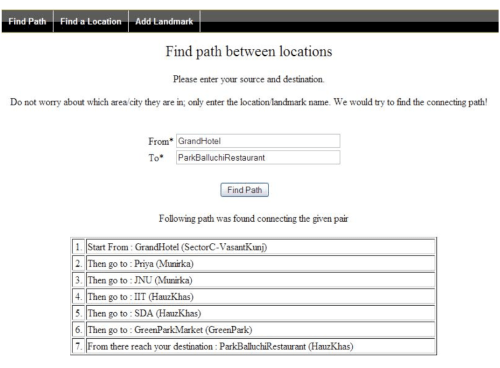
Users can perform three main tasks with the system: “find place”, “trace path” and “add info.” In addition, some or all users may be granted the right to edit or remove entries from the knowledgebase. The Folksomaps system can also be bootstrapped from existing databases to populate instances of location types. “Two such sources of data in the absence of a full-fledged Geographical Information System (GIS) come from the Telecom Industry and the Postal Department.”
folksofig3

How the users interface with the system to carry out these tasks will depend on how tech-savvy or literate they are and what type of access they have to information and communication technologies.

Folksomaps thus provides three types of interface: web-based, voice-based and SMS-based. Each interface allows the user to query and update the database. The web-based interface was developed using Java Server Pages (JSP) while the voice-based interface uses JSPs and VoiceXML.
folksofig41

I am particularly interested in the voice-based interface. The authors point to previous studies that suggest a voice-based interaction works well with users who are illiterate or semi-illiterate and who cannot afford to have high-end devices but can use ordinary low-end phones.
folksofig1

I will share this with the Ushahidi development team with the hopes that they will consider adding a voice-based interface for the platform later this year. To be sure, could be very interesting to integrate Freedom Fone’s work in this area.

Insights from User Studies

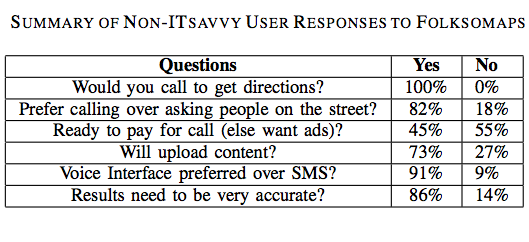
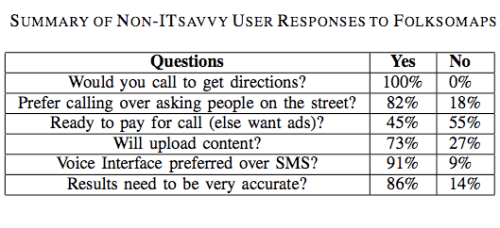
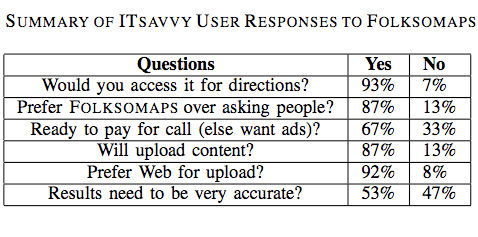
The authors conducted user studies to verify the benefit and acceptability of Folksomaps. Tech-savvy used the web-based interface while non-tech savvy participants used the voice-based interface. The results are shown in the two tables below.
folksotb3

Several important insights surfaced from the results of the user studies. For example, an important insight gained from the non-tech user feedback was “the sense of security that they would get with such a system. […] Even though asking for travel directions from strangers on the street is an option, it exposes the enquirer to criminal elements […].”

Another insight gain was the fact that many non-tech savvy participants were willing to pay for the call even a small premium over normal charges as they saw value to having this information available to them at all times.” That said, the majority of participants “preferred the advertisement model where an advertisement played in the beginning of the call pays for the entire call.”

Interestingly, almost all participants preferred the voice-based interface over SMS even though the former led to a number of speech recognition errors. The reason being that “many people are either not comfortable using SMS or not comfortable using a mobile phone itself.”

There were also interesting insights on the issue of accuracy from the perspective of non-tech savvy participants. Most participants asked for full accuracy and only a handful were tolerant of minor mistakes. “In fact, one of the main reasons for preferring a voice call over asking people for directions was to avoid wrong directions.”

This need for high accuracy is driven by the fact that most people use public transportation, walk or use a bicycle to reach their destination, which means the cost of incorrect information is large compared to someone who owns a car.

This is an important insight since the authors had first assumed that tolerance for incorrect information was higher. They also learned that meta information is as important to non-tech savvy users as the landmarks themselves. For instance, low-income participants were more interested in knowing the modes of available transportation, timetables and bus route numbers than the road route from a source to a destination.
folkstb4

In terms of insights from tech-savvy participants, they did not ask for fine-grained directions all the time. “They were fight with getting high level directions involving major landmarks.” In addition, the need for accuracy was not as strong as for the non-tech savvy respondents and they preferred the content from the queries sent to them via SMS so they could store it for future access, “pointing out that it is easy to forget the directions if you just hear it.”

Some tech-savvy participants also suggested that the directions provided by Folksomaps should “take into consideration the amount of knowledge the subject already has about the area, i.e., it should be personalized based upon user profile. Other participants mentioned that “frequent changes in road plans due to constructions should be captured by such a system—thus making it more usable than just getting directions.”

Conclusion

In sum, the user interface of Folksomaps needs to be “rich and adaptive to the information needs of the user […].” To be sure, given user preference towards “voice-based interface over SMS, designing an efficient user-friendly voice-based user interface […].” In addition, “dynamic and real-time information augmented with traditional services like finding directions and locations would certainly add value to Folksomaps.” Furthermore, the authors recognize that Folksomaps can “certainly benefit from user interface designs,” and “multi-model front ends.”

Finally, the user surveys suggest “the community is very receptive towards the concept of a community-driven map,” so it is important that the TRMA project in the Sudan and the ecosystem Liberia project build on the insights and lessons learned provided in this study.

Patrick Philippe Meier

Crisis Mapping and Agent Based Models

The idea of combining crisis mapping and agent based modeling has been of great interest to me ever since I took my first seminar on complex systems back in 2006. There are few studies out there that ground agent based models (ABM) on conflict dynamics within a real-world geographical space. One of those few, entitled “Global Pattern Formation and Ethnic/Cultural Violence,” appeared in the journal Science in 2007.

Note that I take issue with a number of assumptions that underlie this study as well as the methodology used. That said, the study is a good illustration of how crisis mapping and ABM can be combined.

Introduction

The authors suggest that global patterns of violence arise due to “the structure of boundaries between groups rather than the groups themselves.” In other words, the spatial boundaries between different populations create a propensity for conflict, “so that spatial heterogeneity itself is predictive of local violence.”

The authors argue that this pattern is “consistent with the natural dynamics of “type separation,” a specific pattern formation also observed in physical and chemical phase separation. The unit of analysis in this study’s ABM, however, is the local ethnic “patch size,” which represents the smallest unit of ethnic members that act collectively as one.

The Model

A simple model of type separation assumes that individuals (or ethnic units) prefer to move to areas where more individuals of the same time reside. Playing the ABM yields progressively larger patches or “islands” of each ethnic group over time. The relationship between patch size and time follows a power law distribution, “a universal behavior that does not depend on many of the details of the model […].”

In other words, the model depicts scale invariant behavior, which implies that “a number of individual agents of the model can be aggregated into a single agent if time is rescaled correspondingly without changing the behavior at the larger scales.”

To model violent conflict, the authors assume that both highly mixed regions and well-segregated groups do not engage in violence. The rationale regarding the former being that in highly mixed regions, “groups of the same type are not large enough to develop strong collective identities, or to identify public spaces as associated with one or another group. When groups are much bigger, “they typically form self-sufficient entities that enjoy local sovereignty.”

To this end, the authors argue that partial separation with poorly defined boundaries fosters conflict when groups are of a size that allows them to impose cultural norms on public spaces, “but where there are still intermittent violations of these rules due to the overlap of cultural domains.” In other words, conflict is a function of population distribution and not of the “specific mechanism by which the population achieves this structure, which may include internally or externally directed migrations.”

The model is therefore founded on the principle that the conditions under which violent conflict becomes likely can be determined by census.

The Analysis

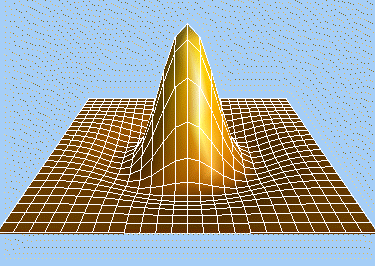
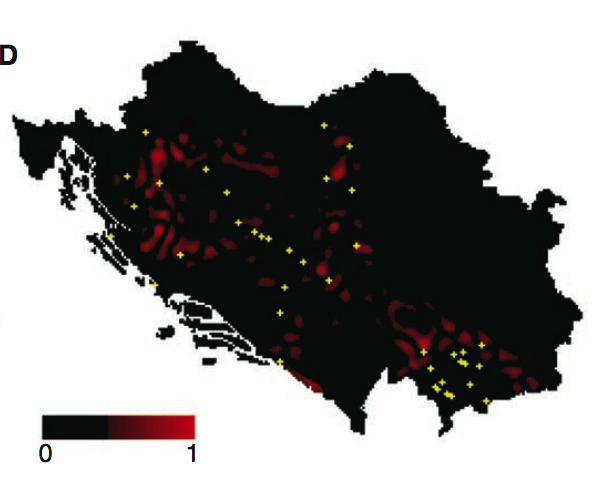
The authors used 1991 census data of the former Yugoslavia and the Indian census data from 2001 and converted the data into map form (see figure below), which they used in an ABM simulation. “Mathematically, the expected violence was determined by detecting patches consisting of islands or peninsulas of one type surrounded by populations of other types.”

mexicanhat

A wavelet filter that has a positive center and a negative surround (also called a Mexican hat filter) was used to detect and correlate the islands/peninsulas. scienceabm1

The red overlays depicted in Figure D above represents the maximum correlation over population types. The diameter of the positive region of the wavelet, i.e., “the size of the local population patches that are likely to experience violence,” is the main predictor of the model.

scienceabm2

To test the predictive power of their model, the authors compared the locations of red overlays with actual incidents of violence as reported in books, newspapers and online sources (the yellow dots in the crisis map below).

yugoabm

Their statistical results indicate that the Yugoslavia crisis map model has a correlation of 0.89 with reports. Moreover, “the predicted results are highly robust to parameter variation [patch size], with essentially equivalent agreement obtained for filter diameters ranging from 18 to 60 km […].”

The statistical results for the India crisis map model indicate a correlation of 0.98. The range of the patch size overlapped that of the former Yugoslavia but is shifted to larger values, up to 100km. This suggests that “regions of width less than 10km or greater than 100km may provide sufficient mixing or isolation to reduce the chance of violence.”

Conclusion

While the authors recognize the importance of social and institutional drivers of violence, they argue that, “influencing the spatial structure might address the conditions that promote violence described [in this study].” In sum, they suggest that, “peaceful coexistence need not require complete integration.”

What do you think?

Patrick Philippe Meier

Threat and Risk Mapping Analysis in Sudan

Massively informative.

That’s how I would describe my past 10 days with the UNDP‘s Threat and Risk Mapping Analysis (TRMA) project in the Sudan. The team here is doing some of the most exciting work I’ve seen in the field of crisis mapping. Truly pioneering. I can’t think of  a better project to apply the past two years of work I have done with the Harvard Humanitarian Initiative’s (HHI) Crisis Mapping and Early Warning Program.

TRMA combines all the facets of crisis mapping that I’ve been focusing on since 2007. Namely, crisis map sourcing, (CMS), mobile crisis mapping (MCM), crisis mapping visualization (CMV), crisis mapping analytics (CMA) and crisis mapping platforms (CMP). I’ll be blogging about each of these in more detail later but wanted to provide a sneak previous in the meantime.

Crisis Map Sourcing (CMS)

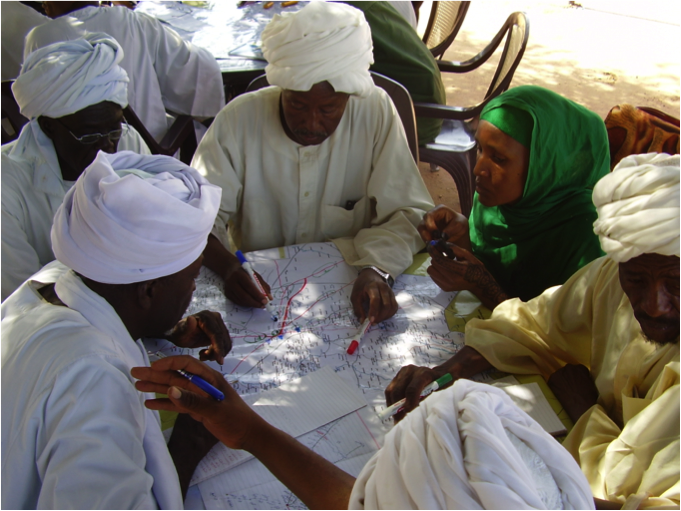
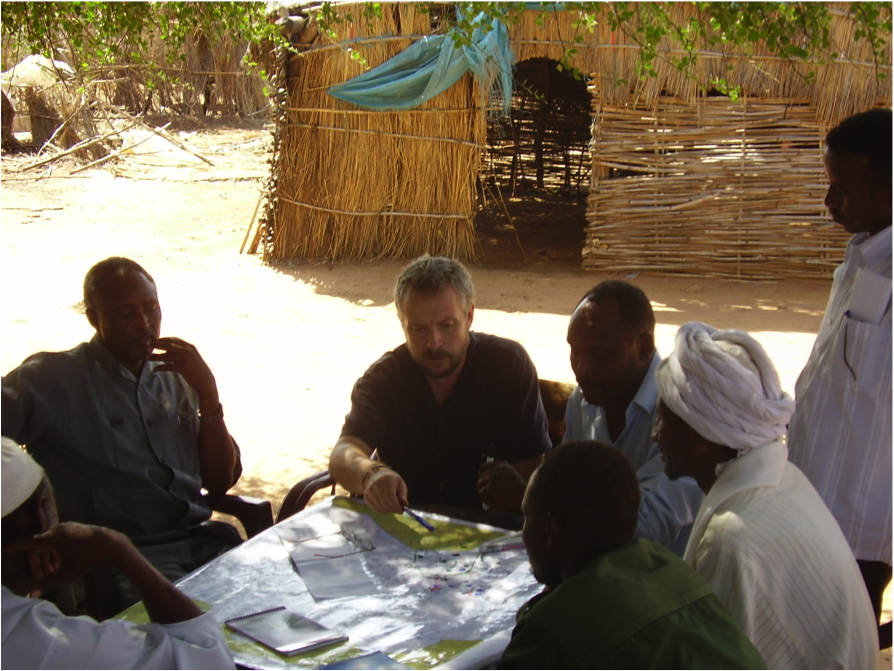
The team facilitates 2-day focus groups using participatory mapping methods. Participants identify and map the most pressing crisis factors in their immediate vicinity. It’s really quite stunning to see just how much conversation a map can generate. Rich local knowledge.

trma1

What’s more, TRMA conducts these workshops at two levels for each locality (administrative boundaries within a state): the community-level and at the state-level. They can then compare the perceived threats and risks from both points of view. Makes for very interesting comparisons.

trma2

In addition to this consultative approach to crisis map sourcing, TRMA has played a pivotal role in setting up an Information Management Working Group (IMWG) in the Sudan, which includes the UN’s leading field-based agencies.

What is truly extraordinary about this initiative is that each agency has formally signed an information sharing protocol to share their geo-referenced data. TRMA had already been using much of this data but the process until now had always been challenging since it required repeated bilateral efforts. TRMA has also developed a close professional relationship with the Central Bureau of Statistics Office.

Mobile Crisis Mapping (MCM)

The team has just partnered with a multinational communications corporation to introduce the use of mobile phones for information collection. I’ll write more about this in the coming weeks. Needless to say, I’m excited. Hopefully it won’t be too late to bring up FrontlineSMS‘s excellent work in this area, as well as Ushahidi‘s.

Crisis Mapping Visualization (CMV)

The team needs some help in this area, but then again, that’s one of the reasons I’m here. Watching first reactions during focus groups when we show participants the large GIS maps of their state is  really very telling. Lots more to write about on this and lots to contribute to TRMA’s work. I don’t yet know which maps can be made public but I’ll do my utmost best to get permission to post one or two in the coming weeks.

Crisis Mapping Analytics (CMA)

The team has produced a rich number of different layers of data which can be superimposed to identify visual correlations and otherwise hidden patterns. Perhaps one of the most exciting examples is when the team started drawing fault lines on the maps based on the data collected and their own local area expertise. The team subsequently realized that these fault lines could potential serve as “early warning” markers since a number of conflict incidents subsequently took place along those lines. Like the other crisis mapping components described above, there’s much more to write on this!

Crisis Mapping Platforms (CMP)

TRMA’s GIS team has used ArcGIS but this has been challenging given the US embargo on the Sudan. They therefore developed their own in-house mapping platforms using open-source software. These platforms include the “Threat Mapper” for data entry during (or shortly after) the focus groups and “4Ws” which stands for Who, What, Where and When. The latter tool is operational and will soon be fully developed. 4Ws will actually be used by members of the IMWG to share and visualize their data.

In addition, TRMA makes it’s many maps and layers available by distributing a customized DVD with ArcReader (which is free). Lots more on this in the coming weeks and hopefully some screenshots as well.

Closing the Feedback Loop

I’d like to add with one quick thought, which I will also expand on in the next few weeks. I’ve been in Blue Nile State over the past three days, visiting a number of different local ministries and civil society groups, including the Blue Nile’s Nomadic Union. We distributed dozens of poster-size maps and had at times hour long discussions while pouring over these maps. As I hinted above, the data visualization can be improved. But the question I want to pose at the moment is: how can we develop a manual GIS platform?

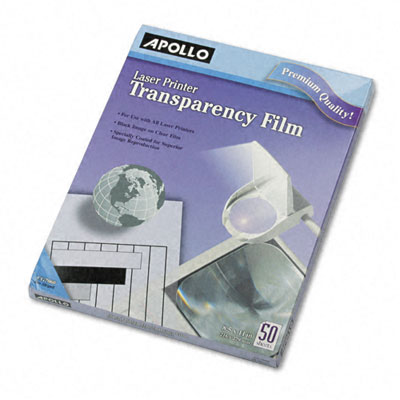
While the maps we distributed were of huge interest to our local partners, they were static, as hard-copy maps are bound to be. This got me thinking about possibly using transparencies to overlap different data/thematic layers over a general hard-copy map. I know transparencies can be printed on. I’m just not sure what size they come in or just how expensive they are, but they could start simulating the interactive functionality of ArcReader.

transparency

Even if they’re only available in A4 size, we could distribute binders with literally dozens of transparencies each with a printed layer of data. This would allow community groups to actually start doing some analysis themselves and could be far more compelling than just disseminating poster-size static maps, especially in rural areas. Another idea would be to use transparent folders like those below and hand-draw some of the major layers. Alternatively, there might a type of thin plastic sheet available in the Sudan.

I’m thinking of trying to pilot this at some point. Any thoughts?

folders

Patrick Philippe Meier

Ushahidi Comes to India for the Elections (Updated)

I’m very please to announce that the Ushahidi platform has been deployed at VoteReport.in to crowdsource the monitoring of India’s upcoming elections. The roll out followed our preferred model: an amazing group of Indian partners took the initiative to drive the project forward and are doing a superb job. I’m learning a lot from their strategic thinking.

picture-3

We’re also excited about developing Swift River as part of VoteReport India to apply a crowdsourcing approach to filter the incoming information for accuracy. This is of course all experimental and we’ll be learning a lot in the process. For a visual introduction to Swift River, please see Erik Hersman’s recent video documentary on our conversations on Swift River, which we had a few weeks ago in Orlando.

picture-5

As per our latest Ushahidi deployments, VoteReport users can report on the Indian elections by email, SMS, Tweet or by submitting an incident directly online at VoteReport. Users can also subscribe to email alerts—a functionality I’m particularly excited about as this closes the crowdsourcing to crowdfeeding feedback loop; so I’m hoping we can also add SMS alerts, funding permitted. For more on crowdfeeding, please see my previous post on “Ushahidi: From Crowdsourcing to Crowdfeeding.

picture-4

You can read more about the project here and about the core team here. It really is an honor to be a part of this amazing group. We also have an official VoteReport blog here. I also highly recommend reading Gaurav Mishra‘s blog post on VoteReport here and Ushahidi’s here.

Next Steps

  • We’re thinking of using a different color to depict “All Categories” since red has cognitive connotations of violence and we don’t want this to be the first impression given by the map.
  • I’m hoping we can add a “download feature” that will allow users to directly download the VoteReport data as a CSV file and as a KML Google Earth Layer. The latter will allow users to dynamically visualize VoteReports over space and time just like [I did here] with the Ushahidi data during the Kenyan elections.
  • We’re also hoping to add a feature that asks those submitting incidents to check-off that the information they submit is true. The motivation behind this is inspired from recent lessons learned in behavioral economics as explained in my blog post on “Crowdsourcing Honesty.

Patrick Philippe Meier

Field Guide to Humanitarian Mapping

MapAction just released an excellent mapping guide for the humanitarian community. Authored principally by Naomi Morris, the guide comprises four chapters that outline a range of mapping methods suitable for humanitarian field word.

The first chapter serves as an introduction to humanitarian mapping. Chapter two explains how to make the best use of GPS for data collection. Note that the latest version of Google Earth (v5.0) includes GPS connectivity. The third and fourth chapters provide a user-friendly, hands-on tutorial on how to use Google Earth and MapWindow for humanitarian mapping.

The purpose of this post is to quickly summarize some of the points I found most interesting in the Guide and to offer some suggestions for further research. I do not summarize the tutorials but I do comment on Google Earth and MapWindow might be improved for humanitarian mapping. The end of this post includes a list of recommended links.

Introduction

John Holmes, the UN Emergency Relief Coordinator and Under-Secretary-General for Humanitarian Affairs argues that “information is very directly about saving lives. If we take the wrong decisions, make the wrong choices about where we put our money and our effort because our knowledge is poor, we are condemning some of the most deserving to death or destitution.”

I completely agree with this priority-emphasis on information. The purpose of crisis mapping and particularly mobile crisis mapping is for at-risk communities to improve their situational awareness during humanitarian crises. The hope is that relevant and timely information will enable communities to make more informed—and thus better— decisions on how to get out of harm’s way. Recall the purpose of people-centered early warning as defined by the UNISDR:

To empower individuals and communities threatened by hazards to act in sufficient time and in an appropriate manner so as to reduce the possibility of personal injury, loss of life, damage to property and the environment, and loss of livelihoods.

Naomi also cites a Senior Officer from the IFRC who explains the need to map vulnerability and develop baselines prior to a disaster context. “The data for these baselines would include scientific hazard data and the outputs from qualitative assessments at community level.”

This point is worth expanding on. I’ve been meaning to write a blog post specifically on crisis mapping baselines for monitoring and impact evaluation. I hope to do so shortly. In the meantime, the importance of baselines vis-à-vis crisis mapping is a pressing area for further research.

Community Mapping

I really appreciate Naomi’s point that humanitarian mapping does not require sophisticated, proprietary software. As she note, “there has been a steady growth in the number of ‘conventional’ desktop GIS packages available under free or open-source licenses.”

Moreover, maps can also be “created using other tools including a pad of graph paper and a pencil, or even an Excel spreadsheet.” Indeed, we should always “consider whether ‘low/no tech’ methods [can meet our] needs before investing time in computer-based methods.”

To this end, Naomi includes a section in her introduction on community-level mapping techniques.

Community-level mapping is a powerful method for disaster risk mitigation and preparedness.  It is driven by input from the beneficiary participants; this benefits the plan output with a broader overview of the area, while allowing the community to be involved. Local people can, using simple maps that they have created, quickly see and analyse important patterns in the risks they face.

Again, Naomi emphasizes the fact that computer-based tools are not essential for crisis mapping at the community level. Instead, we can “compile sketches, data from assessments and notes into representations of the region [we] are looking at using tools like pen and paper.”

To be sure, “in a situation with no time or resources, a map can be enough to help to identify the most at-risk areas of a settlement, and to mark the location of valuable services […].”

Conclusion

I highly recommend following the applied  Google Earth and MapWindow tutorials in the Guide. They are written in a very accessible way that make it easy to follow or use as a teaching tool, so many thanks to Naomi for putting this together.

I would have liked to see more on crisis mapping analysis in the Guide but the fact of the matter is that Google Earth and MapWindow provide little in the way of simple features for applied geostatistics. So this is not a criticism of the report or the author.

Links

Patrick Philippe Meier

WikiMapAid, Ushahidi and Swift River

Keeping up to date with science journals always pays off. The NewScientist just published a really interesting piece related to crisis mapping of diseases this morning. I had to hop on a flight back to Boston so am uploading my post now.

The cholera outbreak in Zimbabwe is becoming increasingly serious but needed data on the number cases and fatalities to control the problem is difficult to obtain. The World Health Organization (WHO) in Zimbabwe has stated that “any system that improves data collecting and sharing would be beneficial.”

This is where WikiMapAid comes in. Developed by Global Map Aid, the wiki enables humanitarian workers to map information on a version of Google Maps that can be viewed by anyone. “The hope is that by circumventing official information channels, a clearer picture of what is happening on the ground can develop.” The website is based on a “Brazilian project called Wikicrimes, launched last year, in which members of the public share information about crime in their local area.”

wikimapaid

WikiMapAid allows users to create markers and attach links to photographs or to post a report of the current situation in the area. Given the context of Zimbabwe, “if people feel they will attract attention from the authorities by posting information, they could perhaps get friends on the outside to post information for them.”

As always with peer-produced data, the validity of the information will depend on those supplying it. While moderators will “edit and keep track of postings […], unreliable reporting could be a problem. In order to address this, the team behind the project is “developing an algorithm that will rate the reputation of users according to whether the information they post is corroborated, or contradicted.”

This is very much in line with the approach we’re taking at Ushahidi for the Swift River project. As WikiMapAid notes, “even if we’re just 80 per cent perfect, we will still have made a huge step forward in terms of being able to galvanize public opinion, raise funds, prioritize need and speed the aid on those who need it most.”

Time to get in touch with the good folks at WikiMapAid.

Patrick Philippe Meier
Crime Mapping Analytics

There are important parallels between crime prevention and conflict prevention.  About half-a-year ago I wrote a blog post on what crisis mapping might learn from crime mapping. My colleague Joe Bock from Notre Dame recently pointed me to an excellent example of crime mapping analytics.

The Philadelphia Police Department (PPD) has a Crime Analysis and Mapping Unit  (CAMU) that integrates Geographic Information System (GIS) to improve crime analysis. The Unit was set up in 1997 and the GIS data includes a staggering 2.5 million new events per year. The data is coded from emergency distress calls and police reports and overlaid with other data such as bars and liquor stores, nightclubs, locations of surveillance cameras, etc.

For this blog post, I draw on the following two sources: (1) Theodore (2009). “Predictive Modeling Becomes a Crime-Fighting Asset,” Law Officer Journal, 5(2), February 2009; and (2) Avencia (2006). “Crime Spike Detector: Using Advanced GeoStatistics to Develop a Crime Early Warning System,” (Avencia White Paper, January 2006).

Introduction

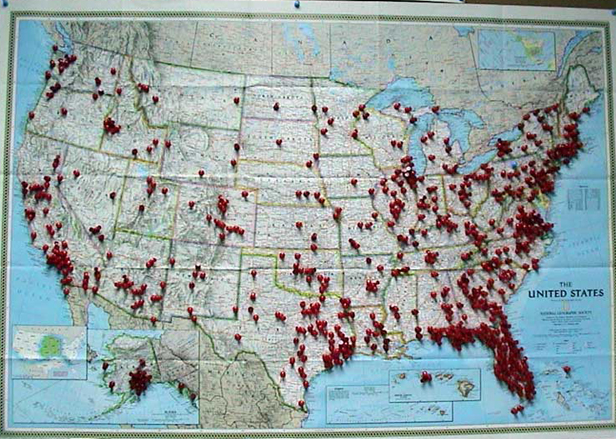
Police track criminal events or ‘incidents’ which are “the basic informational currency of policing—crime prevention cannot take place if there is no knowledge of the location of crime.” Pin maps were traditionally used to represent this data.

pinmap

GIS platforms now make new types of analysis possible beyond simply “eyeballing” patterns depicted by push pins. “Hot spot” (or “heat map”) analysis is one popular example in which the density of events is color coded to indicate high or low densities.

Hotspot analysis, however, in itself, does not tell people much they did not already know. Crime occurs in greater amounts in downtown areas and areas where there are more people. This is common sense. Police organize their operations around these facts already.

The City of Philadelphia recognized that traditional hot spot analysis was of limited value and therefore partnered with Avencia to develop and deploy a crime early warning system known as the Crime Spike Detector.

Crime Spike Detector

The Crime Spike Detector is an excellent example of a crime analysis analytics tool that serves as an early warning system for spikes in crime.

The Crime Spike Detector applies geographic statistical tools to discover  abrupt changes in the geographic clusters of crime in the police incident database. The system isolates these aberrations into a cluster, or ‘crime spike’. When such a cluster is identified, a detailed report is automatically e-mailed to the district command staff responsible for the affected area, allowing them to examine the cluster and take action based on the new information.

The Spike Detector provides a more rapid and highly focused evaluation of current conditions in a police district than was previously possible. The system also looks at clusters that span district boundaries and alerts command staff on both sides of these arbitrary administrative lines, resulting in more effective deployment decisions.

spikedetector

More specfically, the spike detector analyzes changes in crime density over time and highlights where the change is statistically significant.

[The tool] does this in automated fashion by examining, on a nightly basis, millions of police incident records, identifying aberrations, and e-mailing appropriate police personnel. The results are viewed on a map, so exactly where these crime spikes are taking place are immediately understandable. The map supports ‘drill-through’ capabilities to show detailed graphs, tables, and actual incident reports of crime at that location.

Spike Detection Methodology

The Spike Detector compares the density of individual crime events over both space and time. To be sure, information is more actionable if it is geographically specified for a given time period regarding a specific type of crime. For example, a significant increase in drug related incidents in a specific neighborhood for a given day is more concrete and actable than simply observing a general increase in crime in Philadelphia.

The Spike Detector interface allows the user to specify three main parameters: (1) the type of crime under investigation; (2) the spatial and, (3) the temporal resolutions to analyze this incident type.

Obviously, doing this in just one way produces very limited information. So the Spike Detector enables end users to perform its operations on a number of different ways of breaking up time, space and crime type. Each one of these is referred to as a user defined search pattern.

To describe what a search pattern looks like, we first need to understand how the three parameters can be specified.

Space. The Spike Detector divides the city into circles of a given radius. As depicted below, the center points of these circles from a grid. Once the distance between these center points is specified, the radius of the circle is set such that the area of the circles completely covers the map. Thus a pattern contains a definition of the distance between the center points of circles.

circles

Time. The temporal parameter is specified such that a recent period of criminal incidents can be compared to a previous period. By contrasting the densities in each circle across different time periods, any significant changes in density can be identified. Typically, the most recent month is compared to the previous year. This search pattern is know as bloc style comparison. A second search pattern is periodic, which “enables search patterns based on crime types that vary on a seasonal basis.”

Incident. Each crime is is assigned a Uniform Crime Reporting code. Taking all three parameters together, a search pattern might look like the following

“Robberies no Gun, 1800, 30, Block, 365”

This means the user is looking for robberies committed without a gun, with distance between cicle center points of 1,800 feet, over the past 30 days of crime data compared to the previous year’s worth of crime.

Determining Search Patterns

A good search pattern is determined by a combination of three factors: (1) crime type density; (2) short-term versus long-term patterns; and (3) trial and error. Crime type is typically the first and easiest parameter of the search pattern to be specified. Defining the spatial and temporal resolutions requires more thought.

The goal in dividing up time and space is to have enough incidents such that comparing a recent time period to a comparison time period is meaningful. If the time or space divisions are too small, ‘spikes’ are discovered which represent a single incident or few incidents.

The rule of thumb is to have an average of at least 4-6 crimes each in each circle area. More frequent crimes will permit smaller circle areas and shorter time periods, which highlights spikes more precisely in time and space.

Users are typically interested in shorter and most recent time periods as this is most useful to law enforcement while “though the longer time frames might be of interest to other user communities studying social change or criminology.” In any event,

Patterns need to be tested in practice to see if they are generating useful information. To facilitate this, several patterns can be set up looking at the same crime type with different time and space parameters. After some time, the most useful pattern will become apparent and the other patterns can be dispensed with.

Running Search Patterns

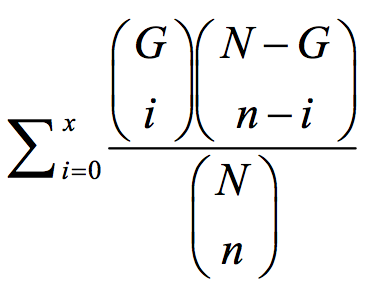
The spike detection algorithm uses simple statistical analysis to determine whether the  probability that the number of recent crimes as compared to the comparison period crimes in a given circle area is possible due to chance alone. The user specifies the confidence level or sensitivity of the analysis. The number is generally set at 0.5% probability.

Each pattern results in a probability (or p-value) lattice assigned to every circle center point. The spike detector uses this lattice to construct the maps, graphs and reports that the spike detector presents to the user. A “Hypergeometic Distribution” is used to determine the p-values:

hypergeometric

Where, for example:

N – total number of incidents in all Philadelphia for both the previous 365 days and the current 30 days.

G – total number of incidents in all Philadelphia for just the past 30 days.

n – number of incidents in just this circle for both the previous 365 days and the past 30 days.

x – number of incidents in just this circle for the past 30 days.

After the probability lattice is generated, the application displays spikes in order of severity and whether they have increased or decreased as compared to the previous day.

Conclusion

One important element of crisis mapping which is often overlooked is the relevance to monitoring and evaluation. With the Spike Detector, the Police Department “can assess the impact and effectiveness of anticrime strategies.” This will be the subject of a blog post in the near future.

For now, I conclude with the following comment from the Philadelphia Police Department:

GIS is changing the way we operate. All police personnel, from the police commissioner down to the officer in the patrol car, can use maps as part of their daily work. Our online mapping applications needed to be fast and user-friendly because police officers don’t have time to become computer experts. I think we’ve delivered on this goal, and it’s transforming what we do and how we serve the community.

Clearly, crime mapping analytics has a lot offer those of us interested in crisis mapping of violent conflict in places like the DRC and Zimbabwe. What we need is a Neogeography version of the Spike Detector.

Patrick Philippe Meier